We’ll be back soon!
Sorry for the inconvenience but we’re performing some maintenance at the moment. If you need to you can always contact us, otherwise we’ll be back online shortly!
— The Team
In 2025-26, video editing has become more advanced than ever, enabling creators to produce high-quality, engaging YouTube content efficiently. Whether you're a beginner or a professional, choosing the right video editing tools can significantly impact your workflow and content quality.
With numerous software options available, selecting the best tools for YouTube video editing can be overwhelming. This article explores the top 5 video editing tools that will enhance your content, increase engagement, and help you rank higher on YouTube.
Before diving into the top tools, it's important to understand why selecting the right video editing software is crucial. A good video editor should:
● Enhance video quality
● Provide easy-to-use features
● Offer advanced AI editing capabilities
● Support multiple formats and high resolutions (4K, 8K)
● Improve engagement with effects, transitions, and audio enhancements
● Be optimized for YouTube’s video requirements
Best for: Professional video editors and content creators
Adobe Premiere Pro continues to dominate the video editing industry. It offers an extensive range of features, including multi-cam editing, VR support, and AI-driven auto-reframe tools.
Key Features:
● Seamless integration with Adobe After Effects
● AI-powered automatic editing suggestions
● Professional-grade color correction and grading
● Multiple export formats, optimized for YouTube
Pricing: Starts at $20.99 per month with Adobe Creative Cloud subscription.
Pros:
● Industry-leading editing tools
● Regular updates with new features
● Excellent third-party plugin support
Cons:
● Requires a powerful computer
● Steeper learning curve for beginners
Best for: Mac users and professional YouTubers
Final Cut Pro X is Apple’s premium video editing software that offers outstanding performance and deep integration with macOS.
Key Features:
● Magnetic Timeline for faster editing
● Advanced color grading and HDR support
● Optimized for Apple Silicon chips
● AI-powered object tracking and motion graphics
Pricing: One-time purchase of $299.99
Pros:
● One-time payment (no subscription fees)
● Super-fast rendering and processing
● Best optimization for Mac users
Cons:
● Only available on macOS
● Limited third-party plugin support compared to Adobe Premiere Pro
Best for: Editors who need powerful color grading and visual effects
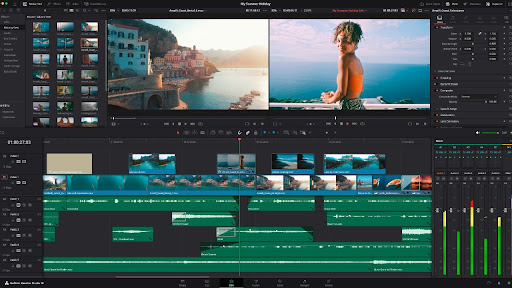
DaVinci Resolve is a free yet professional-grade video editing software used by filmmakers and YouTubers alike.
Key Features:
● Advanced color grading tools
● Fusion visual effects for cinematic looks
● AI-driven noise reduction and facial recognition
● Built-in Fairlight audio editing software
Pricing: Free version available; DaVinci Resolve Studio costs $295 (one-time purchase).
Pros:
● Industry-leading color correction tools
● No subscription fees
● Multi-user collaboration support
Cons:
● High learning curve for beginners
● Requires a powerful system for smooth performance
Best for: Beginners and intermediate creators looking for easy editing
Filmora by Wondershare offers an intuitive interface and powerful AI-driven editing tools, making it perfect for YouTube content creation.
Key Features:
● AI-powered auto-cut and motion tracking
● Pre-built transitions and templates
● Green screen and keyframe animation support
● 4K video export support
Pricing: Starts at $49.99 per year or $79.99 for a lifetime license.
Pros:
● Beginner-friendly interface
● Affordable pricing
● Fast rendering speeds
Cons:
● Limited advanced features compared to professional software
● Watermark in free version
Best for: Free, lightweight video editing software
VSDC is a feature-rich free video editor that offers a great balance of performance and usability.
Key Features:
● Non-linear video editing
● Built-in audio editing and voice-over tools
● Advanced effects, transitions, and filters
● Supports multiple video formats and resolutions
Pricing: Free version available; Pro version costs $19.99 per year.
Pros:
● Completely free to use
● Low system requirements
● Powerful effects and filters
Cons:
● Limited customer support
● Interface feels outdated compared to competitors
If you're looking for an AI-driven tool that can help you quickly create viral Shorts and Reels from your long-form YouTube videos, VShorts AI is an excellent option. VShorts AI automatically detects the most engaging moments in speech-based videos, adds subtitles, and formats them into high-converting short clips.
Key Features:
● AI-powered content detection to identify viral moments
● Automatic subtitle generation for better engagement
● Supports YouTube Shorts, Instagram Reels, and TikTok videos
● Optimized for high-resolution exports
Why Choose VShorts AI?
● Saves hours of manual editing
● Increases audience engagement and reach
● Affordable pricing with flexible plans
With VShorts AI, creators can streamline their editing process and maximize their YouTube growth effortlessly.
Ans: Filmora and VSDC Free Video Editor are excellent choices for beginners. But Vshorts ai is best for clipping.
Ans: DaVinci Resolve and VSDC Free Video Editor offer professional features at no cost.
Ans: Adobe Premiere Pro and Final Cut Pro X provide advanced tools for short-form content, while VShorts AI offers an AI-powered solution.
Ans: Yes, DaVinci Resolve and VSDC Free Video Editor support 4K editing.
Ans: Yes, it provides AI-powered tools and an easy-to-use interface for YouTube creators.
Ans: Adobe Premiere Pro remains the industry leader for professional video editing.
Ans: YouTube does not officially recommend any specific software, but Adobe Premiere Pro and Final Cut Pro X are widely used by YouTubers. Also Vshorts.ai is the best one click editor for YouTube shorts.
Ans: DaVinci Resolve is the best for color grading and cinematic looks.
Ans: VSDC Free Video Editor and DaVinci Resolve offer powerful free versions.
Ans: Yes, apps like Kinemaster and Adobe Premiere Rush allow mobile video editing.
Choosing the right video editing software can significantly impact the quality and engagement of your YouTube content. With AI-driven solutions like VShorts AI, you can effortlessly create viral short videos and maximize your reach
Sorry for the inconvenience but we’re performing some maintenance at the moment. If you need to you can always contact us, otherwise we’ll be back online shortly!
— The Team